
Roman Hindi Captions: How to Add Hindi in English Letters to Your Videos

Your viewers comment "kya baat hai" and "bahut badhiya", in English letters. But when you add Hindi captions to your video, they often come out in Devanagari: "क्या बात है". Same words, different script, and not always the one your audience prefers to read.
Roman Hindi captions fix that. They keep your words in Hindi but write them in English letters, the way people text. They suit Hinglish audiences, viewers outside Hindi-speaking states who don't read Devanagari, and NRI audiences abroad.
This guide explains what Roman Hindi captions are, which app makes them automatically, how to add them step by step, and how to keep your spellings consistent so your captions look professional.
What are Roman Hindi captions?
Roman Hindi captions are Hindi captions written in English (Roman) letters instead of Devanagari. The words and grammar stay Hindi; only the script changes. They're also called Romanized Hindi subtitles, Hindi in English letters or Hindi captions in Roman script, and they're a common way to write Hinglish.
Here's the same line both ways:
| Script | Caption |
|---|---|
| Roman Hindi | Aaj hum ek simple trick try karenge |
| Devanagari | आज हम एक सिंपल ट्रिक ट्राई करेंगे |
Hinglish captions in English letters work the same way: the Hindi words are written in Roman script, and the English words stay in normal English spelling.
Hindi is a big part of India's creator economy. A 2026 ISB–Hashfame report found that Hindi creators make up 42% of India's creator base, so the script you caption in matters.
Roman Hindi vs Devanagari vs English subtitles
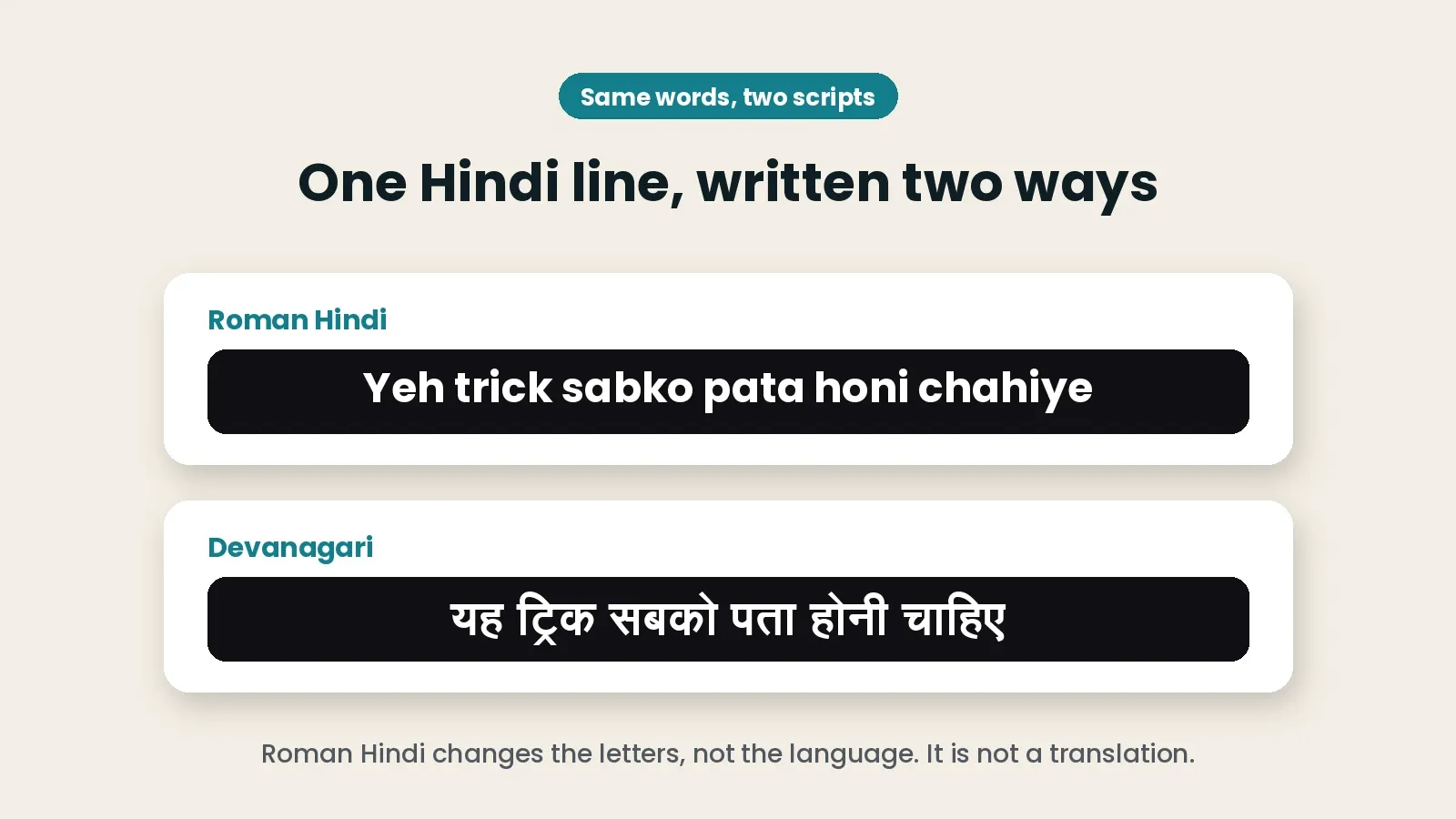
Roman Hindi and Devanagari captions show the same Hindi words in two different scripts. English subtitles are a translation: the words change to English. If your viewers understand Hindi but prefer reading English letters, you want Roman Hindi, not English subtitles.
| What it is | Example | Best for | |
|---|---|---|---|
| Roman Hindi | Hindi words in English letters | "Yeh trick sabko pata honi chahiye" | Hinglish Reels and Shorts, viewers who don't read Devanagari, NRI audiences |
| Devanagari | Hindi words in Hindi script | "यह ट्रिक सबको पता होनी चाहिए" | News, devotional and educational videos, Hindi-first audiences |
| English subtitles | A translation into English | "Everyone should know this trick" | Viewers who don't understand Hindi |
Roman Hindi is transliteration (changing the script), not translation (changing the language). In Capzo, translation into English is a separate feature, AI Subtitle Translation, available on the Pro Creator and Creator Studio plans.
Which app makes Roman Hindi captions automatically?
Capzo (capzo.ai) makes Roman Hindi captions automatically. Upload your video, choose Roman in the script setting, and Capzo writes your Hindi and Hinglish speech in English letters. You can switch the script between Roman and Devanagari for Hindi and every other Indian language.
Capzo is an AI caption and subtitle generator for creators, in 100+ languages, including all 22 official Indian languages. It detects Hinglish automatically, so mixed Hindi-English speech comes out in one consistent script, and it adds word-synced subtitles inside your video.
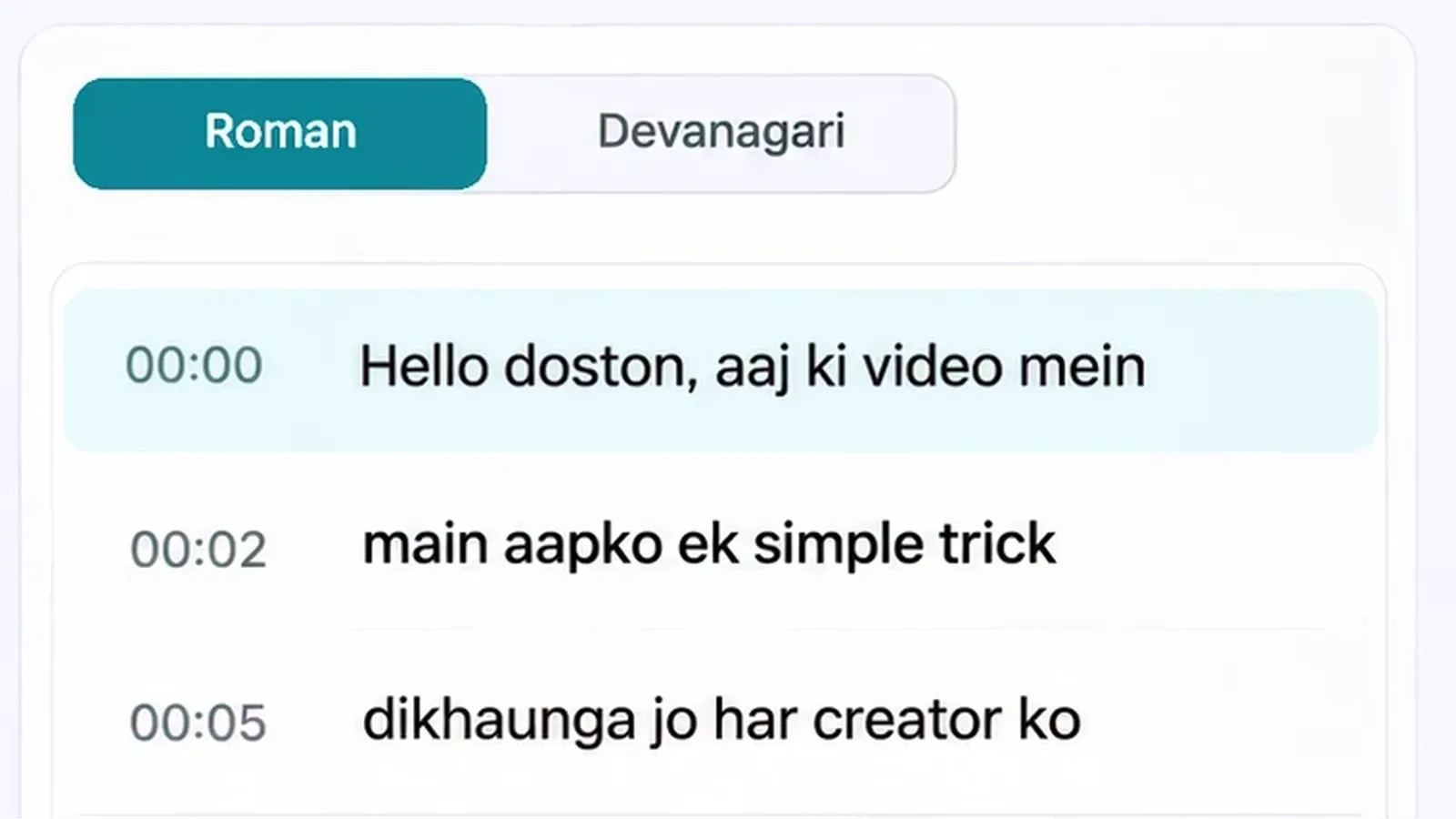
Start with the Hinglish caption generator for mixed Hindi-English videos, or the Hindi subtitle generator for pure Hindi videos.
What you get on Capzo's Free plan: 5 minutes of captions per month, videos up to 2 minutes, 720p export, no watermark, and SRT and VTT subtitle files.
How to add Roman Hindi captions to a video, step by step
To add Roman Hindi captions to a video, upload it to Capzo, pick Roman in the script setting, check spellings and names, then export an MP4 with captions inside for Reels and Shorts, or an SRT file for YouTube. Hinglish is detected automatically, so you don't need to choose a language first.
Step 1: Upload your video
Open the Hinglish caption generator or the Hindi subtitle generator and upload your video.
Step 2: Pick Roman in the script setting
Choose Roman so Hindi words appear in English letters ("kya haal hai") instead of Devanagari ("क्या हाल है").
Step 3: Fix spellings and names
Read every line. Make common words follow one spelling (see the style guide below), and check names and brand words.
Step 4: Export
For Reels and Shorts, export an MP4 with the captions burned in. For YouTube, download an SRT file and upload it in YouTube Studio.
How to keep Roman Hindi spellings consistent
Roman Hindi has no single official spelling, so the same word can be written several ways ("nahi", "nahin", "nai"). Pick one spelling for each common word and use it in every caption. Consistent spelling is what makes Roman Hindi captions look professional instead of rushed.
Here's a simple style guide you can copy:
| Word | Use this | Avoid mixing with |
|---|---|---|
| है | hai | he, h, hain (when you mean "is") |
| नहीं | nahi | nahin, nai, nhi |
| क्या | kya | kia, kyaa |
| बहुत | bahut | bohot, bhot, bahot |
| अच्छा | achha | accha, acha, achchha |
| क्योंकि | kyunki | kyuki, kyonki, kyunke |
| में | mein | me, main, mai |
| हम | hum | ham |
| आप | aap | ap |
| ठीक | theek | thik, theekh |
These are our recommended spellings, not an official standard. What matters most is using the same spelling every time.
Three more rules:
- Don't mix "hai" and "he". Pick "hai" and use it everywhere.
- Keep English words in normal English spelling. Write "video", "trick" and "subscribe", not "vidio" or "sabskraib".
- Write names the way the person writes them. If a creator writes their name as "Shubh", don't change it to "Shubha".
Already have Devanagari captions? How to switch to Roman
If your captions are already in Devanagari, you don't need to re-record or re-type anything. In Capzo, switch the script setting from Devanagari to Roman and export again. The words stay the same Hindi words; only the letters change, because this is transliteration, not translation.
After switching, scan the captions once with the style guide above. Changing the script is a good moment to make spellings consistent too.
Roman Hindi captions on Instagram and YouTube
For Instagram Reels and YouTube Shorts, burn Roman Hindi captions into the video so every viewer sees them. For long YouTube videos, upload an SRT file in YouTube Studio, so viewers can turn captions on or off. Both work from the same Capzo project.
Reels and Shorts: export an MP4 with captions inside and upload it as usual. Keep captions in the middle of the frame, away from the app's buttons. If Instagram's own auto captions get your Hindi wrong, here's how to fix them or switch.
YouTube long-form: download the SRT file and upload it in YouTube Studio under Subtitles. Our guide on making an SRT file for a Hindi video walks through the upload step by step.
Uploading to YouTube? Here's how to add Hinglish subtitles to YouTube videos and Shorts.
FAQ
What is Roman Hindi?
Roman Hindi is Hindi written in English (Roman) letters, like "aaj hum try karenge". The words and grammar stay Hindi; only the script changes from Devanagari to English letters.
Which app gives Hindi captions in English letters?
Capzo gives Hindi captions in English letters automatically. Choose Roman in the script setting before export, and your Hindi and Hinglish speech is written in Roman script.
Is Roman Hindi the same as Hinglish?
No. Hinglish means mixing Hindi and English words when you speak; Roman Hindi is a way of writing Hindi in English letters. Hinglish captions are usually written in Roman letters.
Can I switch my Hindi captions from Devanagari to Roman?
Yes. In Capzo, switch the script setting from Devanagari to Roman and export again. You don't need to re-record, because only the script changes, not the words.
Can I download Roman Hindi captions as an SRT file for free?
Yes. Capzo's Free plan includes SRT and VTT subtitle files with no watermark, for up to 5 minutes of captions a month and videos up to 2 minutes.
Does Roman Hindi work for other Indian languages?
Yes. Capzo has a Roman script option for every Indian language, so you can caption Tamil, Bengali, Marathi and other languages in English letters too.
Sources
- ISB–Hashfame, India's creator economy report (2026)
- Capzo plan and feature details from capzo.ai, checked November 2026.
Captions in the script your viewers read
Your viewers already read Hindi in English letters every day. Capzo gives your videos Roman Hindi captions automatically, with word-synced timing and no watermark on any plan.
Get accurate Hindi and Hinglish captions with Capzo.
Try Capzo free