
HINGLISH CAPTIONS

Best Hinglish Caption Generators for Videos

Most caption tools pick one language and get the other half wrong. We compared 6 tools that handle mixed Hindi-English speech, on script, free plans, watermarks and price.

✓ Roman or Devanagari
✓ No watermark on Free
✓ SRT, VTT and TXT
✓ 100+ languages

Free plan: 5 minutes of captions a month. No credit card required.

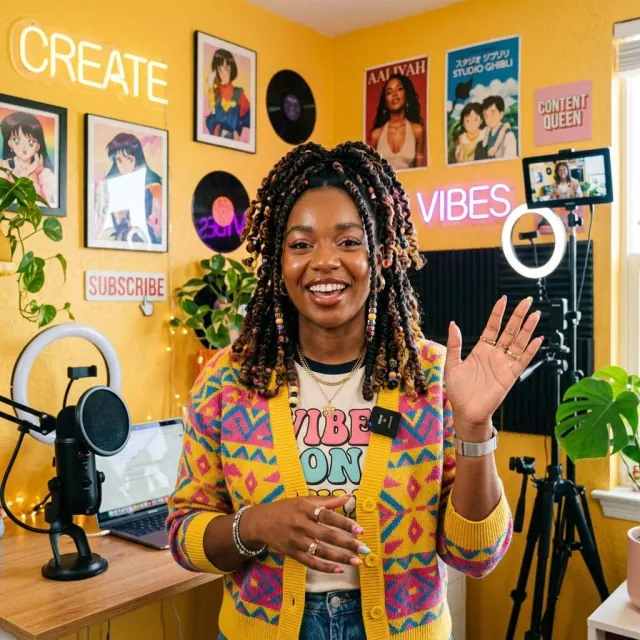
Creator video with Hinglish captions in Roman and Devanagari script
Aaj ka video bahut special hai!

Which Hinglish Caption Generator Should You Use?

For most creators, Capzo is the best Hinglish caption generator: it detects mixed Hindi-English speech automatically, shows it in Roman or Devanagari script, and exports without a watermark, even on the free plan.

🏆

Best overall: Capzo

Auto-detects Hinglish, Roman or Devanagari, no watermark on any plan, SRT/VTT/TXT files.

🎟️

Best for one-off packs: CapsAI

Pay-as-you-go caption packs instead of a monthly plan.

📱

Best inside Instagram: Edits

Free and quick for Reels, but no Hinglish option and no subtitle files.

Hinglish Caption Generators Compared

ToolHinglish outputFree planWatermark on free exportsSubtitle filesPaid from
CapzoDetects Hinglish automatically; Roman or Devanagari5 min every month, videos up to 2 min, 720pNoSRT, VTT, TXT (SRT/VTT on Free)₹499/month billed yearly (₹699 monthly), 90 min
VideoCaptions.aiHindi in Devanagari by default; can convert to Roman225 one-time credits, videos up to 2 minYesSRT, VTT on paid plans₹499/month + GST, about 20 videos
CapsAIHinglish among 11 languages3 minutes once, to tryNot statedSRT, VTT, ASSOne-time packs from ₹49 (20 min)
KapwingHinglish as a target languageLimited free minutesYesSRT, VTT, TXT$16/month billed yearly
KalakarHindi and about 20 South Asian languagesFree planNot statedSRT from the Creator plan₹559/month billed yearly, plus GST
Instagram EditsHindi captions; no Hinglish optionFree appNoNoneFree

Prices and plans from each tool's official pages and listings, checked 18 November 2026. Plans change often, so check before you buy.

The 6 Best Hinglish Caption Generators

1. Capzo

Capzo (capzo.ai) is an AI caption and subtitle generator built for mixed-language speech. It detects Hinglish automatically and lets you show Hindi words in Roman ("aap kaise ho") or Devanagari ("आप कैसे हो") script, with word-synced timing.

  • Free plan: 5 minutes of captions a month, videos up to 2 minutes, 720p, no watermark
  • Exports: MP4 with burned-in captions, or SRT, VTT and TXT files
  • Languages: 100+, including all 22 official Indian languages
  • Paid plans: from ₹499/month billed yearly (₹699 monthly); AI Subtitle Translation is on Pro Creator and Creator Studio

Best for: Reels, Shorts and YouTube creators who speak Hinglish and want clean captions without a watermark.

Try the Hinglish caption generator →
Capzo export panel with Download Video, Subtitle File and Share to Social options

2. VideoCaptions.ai

VideoCaptions.ai writes Hindi words in Devanagari and English words in Roman by default, and can convert the whole line to Roman letters.

  • Free: 225 one-time welcome credits, videos up to 2 minutes, watermarked exports
  • Paid: Creator ₹499/month + GST for 2,500 credits (about 20 videos); SRT and VTT on paid plans

Best for: creators who want animated short-form styles and templates.

3. CapsAI

CapsAI supports 11 spoken languages, including Hinglish, and sells one-time caption packs instead of a subscription.

  • Free: 3 minutes once, to try
  • Paid: one-time packs: ₹49 for 20 minutes, ₹99 for 60, ₹299 for 180; no watermark on packs; projects kept 3 to 15 days
  • Exports: captioned MP4, plus SRT, VTT and ASS files

Best for: occasional creators who prefer pay-as-you-go packs.

4. Kapwing

Kapwing is a full browser video editor with a Hinglish subtitle option. You can edit the video and captions in one place.

  • Free: limited free minutes; free exports carry a watermark
  • Exports: SRT, VTT and TXT files
  • Paid: from $16/month billed yearly

Best for: creators who also need a full video editor and don't mind paying to remove the watermark.

5. Kalakar

Kalakar is an Indian caption tool with creator-style templates and plugins for Premiere Pro and DaVinci Resolve. It supports about 20 South Asian languages.

  • Paid: from ₹559/month billed yearly, plus GST; SRT downloads start on the ₹792 Creator plan

Best for: editors who caption inside Premiere Pro or DaVinci Resolve.

See Kalakar vs Capzo →

6. Instagram Edits

Instagram's free Edits app adds auto-captions and, since July 2026, bilingual captions in 15 languages, including Hindi. It has no Hinglish option, so mixed Hindi-English lines often need fixing by hand.

  • Free: yes, no watermark
  • Exports: video only, no subtitle files

Best for: quick Reels made entirely inside Instagram.

How to Choose a Hinglish Caption Generator

Check four things before you pick: does it detect mixed speech on its own, can you choose Roman or Devanagari, is the free export clean, and can you download a subtitle file for YouTube.

If you…ChooseWhy
Speak Hinglish on Reels or ShortsCapzoAuto-detects Hinglish, Roman or Devanagari, no watermark
Need SRT files for YouTubeCapzoSRT and VTT even on the free plan
Post in many Indian languagesCapzoAll 22 official Indian languages, part of 100+
Caption only a few videos a yearCapsAIOne-time packs
Need a full editor tooKapwingEditing and captions in one place
Edit in Premiere Pro or DaVinciKalakarEditor plugins
Make everything inside InstagramInstagram EditsFree and built in

Add Hinglish Captions in 3 Steps

01

Upload your video

Upload a Reel, Short or YouTube video to Capzo.

02

Pick Roman or Devanagari

Capzo detects the Hindi-English mix on its own. Choose how Hindi words appear, then fix any word in the editor.

03

Style and export

Pick a caption style and download an MP4 with captions inside the video, or an SRT, VTT or TXT file.

Hinglish Captions: Common Questions

Capzo is the best choice for most creators. It detects mixed Hindi-English speech automatically, shows Hindi in Roman or Devanagari script, and exports without a watermark on every plan, including Free.

A Hinglish caption shows mixed Hindi and English speech as it was spoken, usually with Hindi words in Roman letters, like "Aaj ka video bahut special hai".

Yes. Capzo's Free plan includes 5 minutes of captions every month for videos up to 2 minutes, in 720p, with no watermark and SRT/VTT downloads. VideoCaptions.ai and Kapwing add a watermark to free exports.

Yes. Capzo lets you choose Roman or Devanagari script for Hindi words. VideoCaptions.ai uses Devanagari by default and can convert lines to Roman letters.

Instagram Edits supports Hindi captions but has no Hinglish option, so mixed Hindi-English lines often come out wrong and need editing.

Yes. Capzo exports SRT, VTT and TXT files, and SRT and VTT are included on the Free plan. Upload the SRT in YouTube Studio under Subtitles.

More Capzo Tools and Guides

Hi

Hinglish Caption Generator

Hinglish captions in Roman or Devanagari.

Explore →
अ

Hindi Subtitle Generator

Hindi subtitles for any video.

Explore →
⇄

CapCut Alternatives

Compare 6 caption tools on price and free plans.

Compare →
▶

Add Hinglish captions to Reels

Step-by-step guide for Reels and Shorts.

Read →
Hinglish · Roman · Devanagari
SRT · No watermark ✓

Caption Your Next Hinglish Video Free

Upload a video and get word-synced Hinglish captions in Roman or Devanagari, with no watermark.

Try Capzo Free