
Instagram Auto Captions Wrong in Hindi? Fix Them or Use This Instead
You speak Hindi in your Reel, turn on Instagram's auto captions, and the words on screen aren't what you said. Maybe your Hinglish comes out in a script you didn't want. Maybe a name, a brand or an English word in the middle of a Hindi sentence turns into something else.
There are two ways out. You can fix the captions inside Instagram, which takes a couple of minutes when only a few words are wrong. Or, when most lines are off, you can caption the video before you upload it, with the captions already inside the video.
Captions matter beyond accessibility. A 2026 XR Extreme Reach survey of 3,000 viewers in five countries found that 79% of UK viewers use subtitles at least sometimes.
This guide shows you both: the quick fix in Instagram, how to tell when fixing isn't worth it, and what to use instead.
Why are Instagram's auto captions wrong in Hindi?
Instagram has listed Hindi among its caption languages since 2022, but results vary when you mix Hindi and English, use names and brand words, or speak fast with slang. Speech recognition has to guess which language each word belongs to, and in Hinglish that changes mid-sentence. The fix is to edit the words or caption the video before upload.
Instagram launched auto-generated captions in 17 languages in March 2022, and Hindi was one of them. Support for a language doesn't mean every mixed sentence comes out right, though. If you want the full reason, we explain it in why auto-captions get Hinglish wrong.
How to fix wrong Hindi captions inside Instagram
To fix wrong Hindi captions inside Instagram, add captions to a short test clip, tap the caption text to edit the wrong words, check which script the text appears in, and keep each caption short. For a Reel with only a few mistakes, this takes about two minutes.
Step 1: Test a 15-second clip first
Before captioning your full Reel, try a 15-second clip with both Hindi and English in it. You'll see straight away how well the captions handle your voice.
Step 2: Add the captions
Open your Reel in Instagram's editor and turn on captions. Then wait a few seconds for the text to appear.
Step 3: Edit the wrong words
Tap the caption text and correct each wrong word. Check names and brand words first; that's where auto captions most often slip.
Step 4: Check the script
Look at whether Hindi words appear in Roman letters ("kya haal hai") or Devanagari ("क्या हाल है"). If the script isn't the one your audience reads, editing word by word won't fix it. That's the point to switch to a tool that lets you choose the script.
Step 5: Keep captions short and clear of buttons
Long Hinglish lines crowd the screen. Keep each caption short, and place it in the middle of the frame, away from Instagram's buttons at the bottom and side.
Using the Edits app instead? Our guide on adding Hindi and Hinglish captions in Instagram Edits covers the Edits steps.
When fixing is not worth it
Stop fixing and switch when more than about one word in every three lines is wrong, or when the captions come out in the wrong script. At that point you'll spend longer correcting than captioning from scratch, and it's easy to miss a mistake that your audience will spot.
A simple rule of thumb:
| What you see | What to do |
|---|---|
| One or two wrong words in the whole Reel | Fix them in Instagram |
| A wrong word every 4 to 5 lines | Fix them, then re-check names and English words |
| More than about one wrong word in every 3 lines | Switch to a caption tool |
| Hindi in the wrong script for your audience | Switch to a tool that lets you choose the script |
| You also need a subtitle file (for YouTube or a client) | Switch to a tool that exports SRT |
What to use instead of Instagram's captions
If Instagram's captions need too many fixes, caption the video in a tool built for Hindi and Hinglish, such as Capzo, which lets you choose Roman or Devanagari script. Export it with the captions burned in and upload that to Instagram, or download an SRT file for platforms that accept one.
| Option | Best when | Choose the script | Subtitle file |
|---|---|---|---|
| Fix Instagram's captions | Only a few words are wrong | Depends on what the app generates | Not offered in the app as far as we know |
| Caption in a tool, then upload | Many lines are wrong, or you need a set script | Yes, Roman or Devanagari (in Capzo) | Yes, SRT and VTT (Capzo Free) |
Capzo details from capzo.ai, checked November 2026.
How to caption a Hindi or Hinglish video with Capzo, step by step
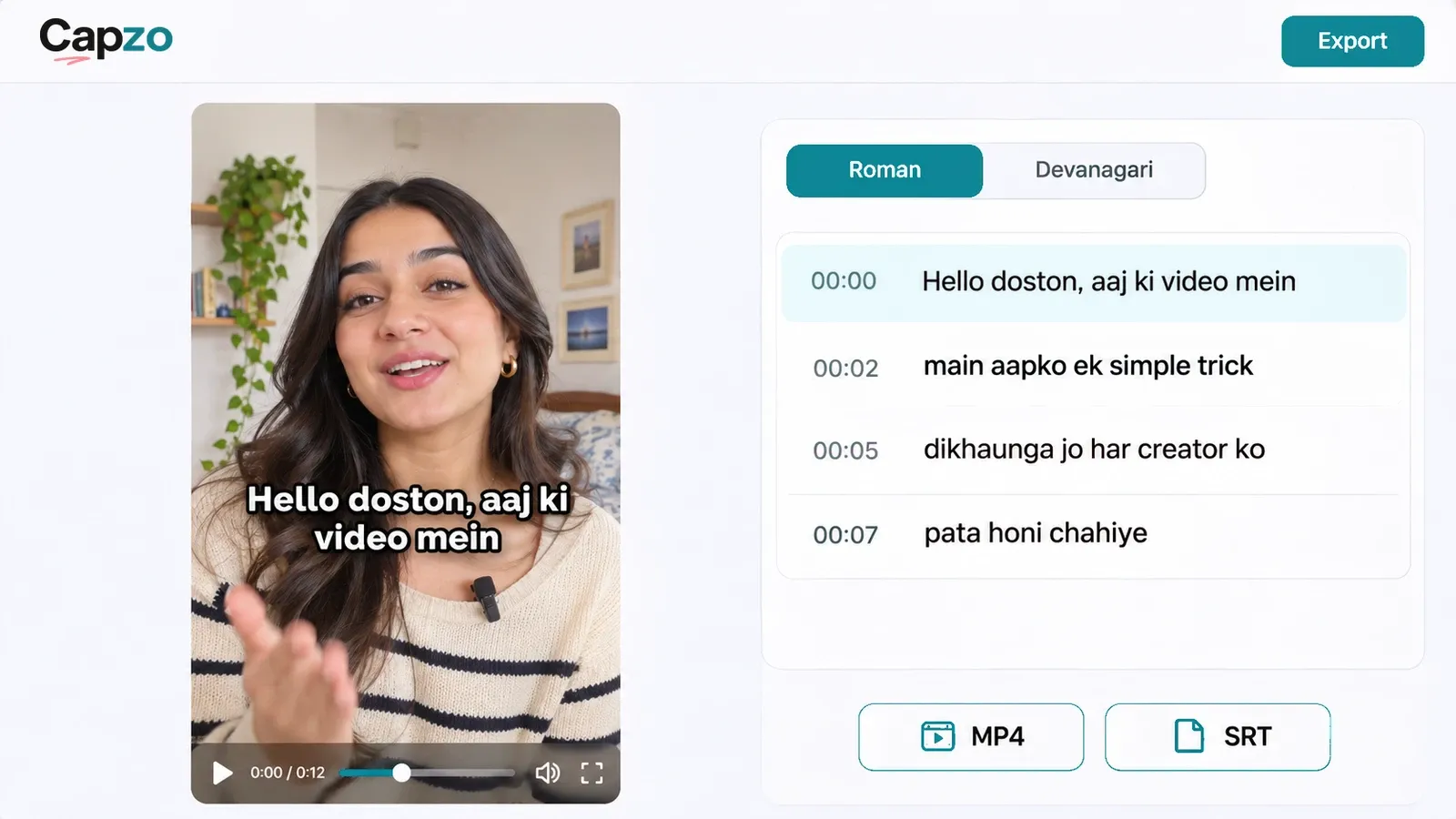
To caption a Hindi or Hinglish video with Capzo, upload your video, choose Roman or Devanagari script, fix any word you want to change, and export an MP4 with captions inside or an SRT file. Hinglish is detected automatically, so you don't need to pick between Hindi and English.
Capzo (capzo.ai) is an AI caption and subtitle generator for creators, in 100+ languages, including Hindi and Hinglish. It adds subtitles inside your video. It doesn't write your Instagram post caption or hashtags.
Step 1: Upload your video
Open the Hinglish caption generator for mixed Hindi-English videos, or the Hindi subtitle generator for pure Hindi videos, and upload your clip.
Step 2: Pick Roman Hindi or Devanagari
Choose how Hindi words should appear: Roman ("kya haal hai") or Devanagari ("क्या हाल है"). Use one script for the whole video.
Step 3: Fix a word and export
Read every line and correct anything you want to change, especially names and brand words. Then export an MP4 with the captions burned in, ready for Instagram, or download an SRT file.
What you get on Capzo's Free plan: 5 minutes of captions per month, videos up to 2 minutes, 720p export, no watermark, and SRT and VTT subtitle files.
Roman Hindi or Devanagari: which one for Reels?
Roman Hindi means Hindi written in English letters, like "kya haal hai". Devanagari is the Hindi script, like "क्या हाल है". It's a style choice. Roman often feels casual and close to how people text, while Devanagari can feel more formal. Pick one and use it for the whole video.
A few things to keep in mind:
- Match how your audience types. If your comments are mostly in Roman Hindi, Roman captions will feel natural.
- Don't mix scripts in one line. "Aaj हम try करेंगे" is harder to read than either script on its own.
- Fonts aren't the same as recognition. Instagram added Indian fonts, including Devanagari, to Edits. Fonts change how text looks, not how well your speech is recognised.
Mistakes that make captions worse
The most common mistakes are stacking Instagram's captions on top of captions already burned into the video, skipping a short test, and leaving names and brand words unchecked. Each one makes captions harder to read or less trustworthy, and all three are easy to avoid.
- Double captions. If your video already has captions burned in, don't add Instagram's captions on top. Two sets of text on screen look messy and cover your video.
- No test clip. Test a 15-second clip first. It shows you how the captions handle your voice before you spend time on the full Reel.
- Unchecked names and brands. Names, brands, prices and English words inside Hindi sentences are where mistakes hide. Check them every time.
- Long lines. Keep each caption short, so viewers can read it before it changes.
FAQ
Why are my Instagram auto captions wrong in Hindi?
Instagram has listed Hindi among its caption languages since 2022, but results vary with mixed Hindi-English speech, names, brand words and slang. Edit the wrong words, or caption the video in a tool built for Hinglish before you upload it.
Can I edit Instagram's auto captions for Hindi?
Yes. Instagram's captions can be edited before you post: tap the caption text and correct the wrong words. If most lines are wrong or the script isn't the one you want, caption the video in another tool instead.
Should Hinglish captions be in Roman or Devanagari?
Either works; it's a style choice. Roman Hindi often feels closer to how people text, Devanagari can feel more formal. Use one script for the whole video.
What can I use instead of Instagram's auto captions for Hindi?
Use a caption tool built for Hindi and Hinglish, such as Capzo. It lets you choose Roman or Devanagari, fix words before export, and download an MP4 with captions inside or an SRT file.
Can I download Hindi captions as an SRT file for free?
Yes. Capzo's Free plan includes SRT and VTT subtitle files with no watermark, for up to 5 minutes of captions a month and videos up to 2 minutes.
Does Capzo write my Instagram post caption or hashtags?
No. Capzo adds subtitles inside your video. It doesn't write the text you post under your Reel or suggest hashtags.
Sources
- TechCrunch, Instagram is rolling out auto-generated captions for videos (2022)
- exchange4media, Instagram introduces local voice translations and fonts in India (2025)
- Business Wire, XR Extreme Reach subtitle survey (2026)
- Capzo plan details from capzo.ai, checked November 2026.
Captions that say what you actually said
When Instagram's captions get your Hindi or Hinglish wrong, you don't have to fix every line by hand. Capzo adds word-synced subtitles inside your video, in Roman or Devanagari, with no watermark on any plan.
Get accurate Hindi and Hinglish captions with Capzo.
Try Capzo free